


Ever gazed upon an image and considered: this might be on the cover of a movie if only it had such dramatic glow, sharper contrast, or deeper colors? You're not the only one. Photos tend to freeze moments magnificently, but not the visual drama that turns them into scroll-stoppers. Welcome Pippit, your behind-the-scenes team for visual storytelling. Using its intelligent features, you can transform an ordinary snap into a director's cut grade. Imagine it as combining your photography skills with an AI clip maker who is fluent in the language of drama, light, and shadow.
Here in this blog, we'll see how uninspiring photos can be turned into movie magic, the lighting and color science that tricks the eye into thinking you shot it on location, and—most importantly—how you can do it all with a few clicks of Pippit.
Why cinematic edits matter in the age of endless scrolls
Photos now fight for attention with thousands of reels, memes, and ads. The secret to standing out isn't always capturing a better moment but framing it in a way that appears polished and cinematic.
Cinematic edits succeed because:
• They instantly elicit emotion (warm colors = nostalgia, high contrast = suspense).
• They provide storytelling without words.
• They make personal branding stand out—turning run-of-the-mill selfies or product photos into impactful visuals.
When your picture feels like it could be up on a theater wall, people pause scrolling.
The magic ingredients of cinematic photos
So what makes an ordinary picture feel like a still from an Oscar-winning movie? Three large things:
Lighting that tells a story
Natural light can be moody, but when lit up, it has the power to change. Imagine sharp spotlights for drama, or soft glows for romance.
Contrast that creates focus
Cinematic cuts typically find a balance of highlights and shadows that hold the viewer's eye where it's most needed.
Mood-setting color grading
An orange-and-teal subtle feel yells Hollywood. Desaturated hues murmur arthouse. High saturation bellows music video freneticism.
When mundane turns dazzling: Inspirations to spark your ideas
Think of these metamorphoses:
• A bland café selfie uplifted to a moody noir portrait.
• A stodgy street snap reborn to a neon-saturated cyberpunk image.
• A group photo designed to resemble a band's official album cover.
This is where editing leaves the realm of repair—it becomes artful narration.
The secret weapon: Edit foto online without stress
There are many people who don't want to deal with fancy software or spend half their day tweaking sliders. That's where edit foto online tools save the day. With sites like Pippit, you don't need to be a design expert—just a picture and an idea.
Pippit's intelligent tools carry out the hard work, whatever it is -- sharpening, correcting low light, or adding filters that instantly give your image that cinematic look.
3 blockbuster ways to boost photos with pippit
Now let's move on to the spotlight moment—how you can really make your photos get the cinematic treatment with Pippit.
Step 1: Upload your photos
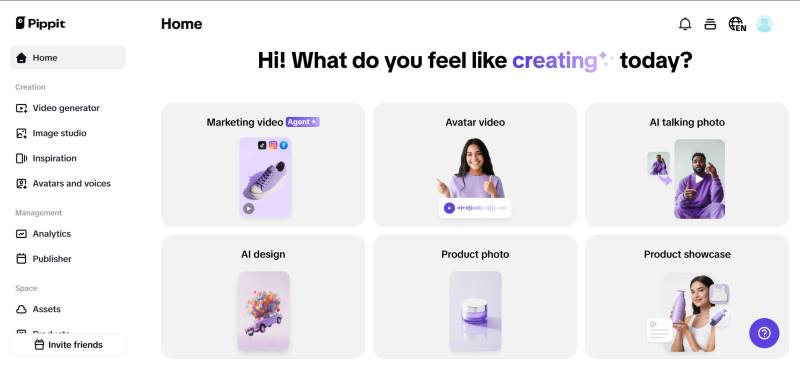
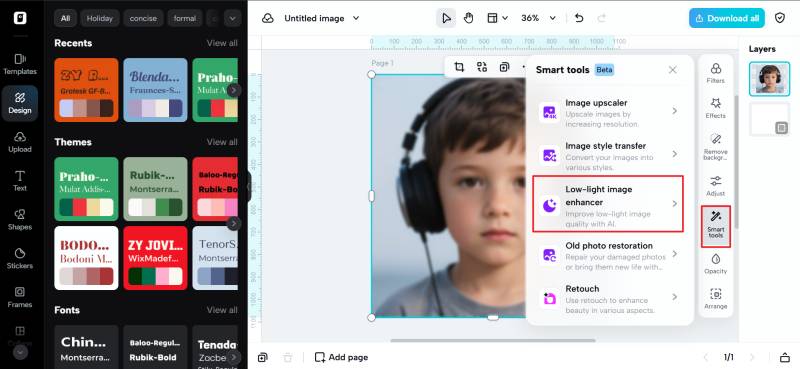
First, enroll in the Pippit image resolution enhancer, go to Image Studio in the left menu, and select Upscale Image. Choose Device to load your image. Alternatively, go to Image Editor, upload your photo, and select Image Upscaler under Smart Tools to allow AI to upscale the image.

Step 2: Upscale and edit your images
Next, apply Retouch to enhance the subject face, Effects to include some colors, or Low-Light Image Enhancer to correct darkness and lack of vibrancy. You can add text over the image, apply stickers, make collages, or sharpen textures and details until your photo is as if taken right off a set.

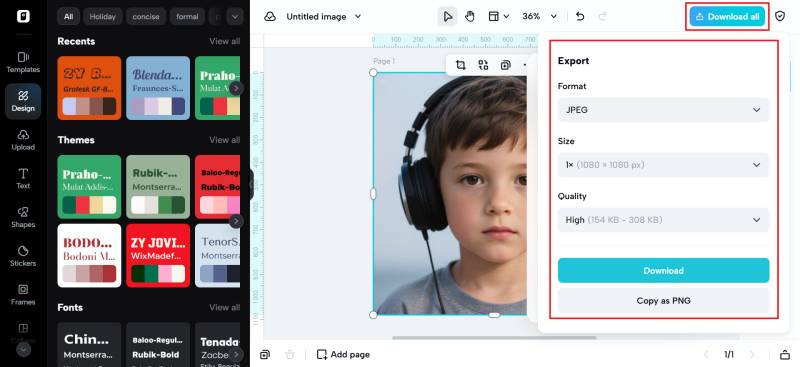
Step 3: Export your images
Click Download All in the top right. Choose the format and size, then click Download to save your work of art. Now it's poster-ready, portfolio-ready, or ready for the premiere of your next artistic endeavor.

Cinefiliatreatments for daily use
It's not just for influencers or photographers. Cinematic treatments can benefit:
• Event promotion (make your birthday invitation a blockbuster trailer).
• Business branding (give product images a premium look).
• Travel journals (bestow landscapes with the grandeur they deserve).
• Social media narrative (be different with visuals that are epic in feel.
When photo meets video: Bonus creativity
Here's a bonus: once you've transformed a photo into something dramatic, it's simple to re-pivot it into video clips. Pippit makes it easy to glide between stills and movement. And if you wish to edit those clips into ideal short-form tales, software such as an online video cutter makes it easy to clip and refine them for Reels, TikTok, or YouTube
Why image enhancer tools are a game-changer
Formerly, making film-quality photos involved mastering pricey, sophisticated editing studios. Today, anyone can tinker with tone, texture, and mood with a free image enhancer online. At the click of a few buttons, you can correct lighting flaws, improve resolution, and add filters that whisk your photo away to a different world.
The best part? No learning curve to climb. No tutorials to wade through. Just results.
Conclusion: Your spotlight moment with Pippit
Transforming bland photographs into film classics isn't luck—its providing your images with the glow-up they were meant to have. Pippit never requires you to be a professional editor or spend countless hours moving sliders back and forth. All you need is your vision, your photo, and three clicks.
So the next time you snap a photo that just doesn't feel like much, don't hit delete—re-imagine. Get behind the director's chair with Pippit and see your ordinary photos go from shadow to center stage.