

Jewelry crafting has also gained popularity, and the number of makers now has their tutorials on the internet, teaching people how to make jewelry online. Nonetheless, the instruction on complex wire wrap or stone settings is not merely a show, but it is the tell. Jewelry tutorials transformed the silent visual into a step-by-step formula, thanks to the engaging voiceover. The AI voice generator on CapCut PC is a tool that enables designers to create lively, sounding, and professional narrations without the need to record their voices. Whether you have handmade rings or want to explain how to assemble earrings, CapCut will make your jewelry video content creation easier, and your tutorials will sound more effective in various parts of the world.
Purpose of Jewelry Craft Education: Teaching Through Tone
Jewelry making is all about technique, but also about inspiration and clarity. The voice generator in CapCut PC can be used to achieve this, as it enables creators to transform scripts into meaningful narrations based on expressive speech and at the desired crafting speed. They do not need to pay for voice talent or fight background sounds made by tools and studio clutter because they can compose a script and create a high-quality voiceover in just a few minutes. Regardless of guiding the audience through intricate beading or heating metal on a craft, the steady voice provides a smoother rollout of the educational aspect. The AI voiceover in CapCut enables both hobbyists and professional jewelry makers to create instructional videos with an academic and friendly tone, generating trust and expertise.
The Role of Engaging Voiceovers in Jewelry Learning
Voice is critical in the sphere of DIY learning. The inclusion of narrations renders tutorials more inclusive, as viewers require accessibility through spoken language or those with a need for a regular pace. Voiceovers also come in handy when recording in a workshop, especially when people are busy, as they ensure that the creators still achieve quality audio without the need for a separate sound booth. The text to speech AI feature in CapCut PC allows jewellers to customise through the availability of multilingual languages, as well as their tone choices, which can be calm and smooth when the tutorial is slow and rhythmic, and high-pitched when the pattern depends on the trend. Such voices will be able to capture the vibe of your project and secure better viewer retention, particularly among foreign audiences. Whether it's the tutorial on how to solder or the advice on selecting the right gemstones, you need a means of confidently guiding the person explaining the process as you concentrate on your craft.
Quick Steps to Edit Jewellery Videos with AI Voice
Step 1: Start Your CapCut Project
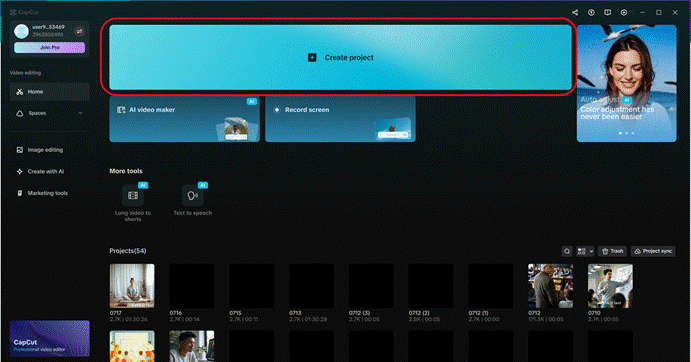
First, you will need to visit the CapCut official website and download the PC version (available for Windows or Mac). After the installation is complete, open the application and press the "Create project" button on the home screen. This opens your editing frame, where you can create your jewel tutorial video.
Step 2: Import Jewellery-Making Footage
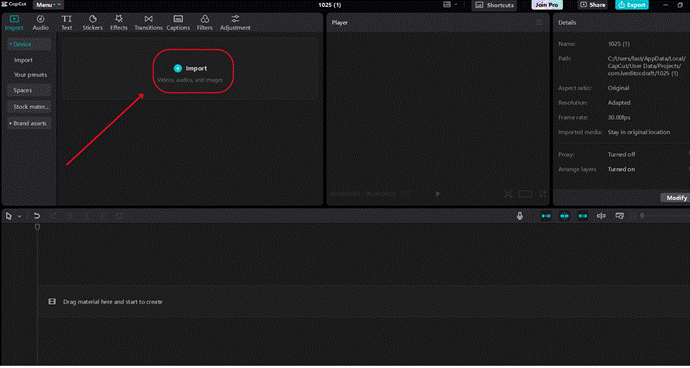
Then, press the "Import" button to import the recorded video clips of your jewellery-making process. They might entail, for example, close shots of bead stringing, soldering, gemstone setting, or polishing. After dropboxing, the simplest thing you can do is drag and drop your clips in the timeline sequence that matches your instructional flow. Keep each section in such a way that the visual footprint backs the voiceover speech.
Step 3: Add AI Voice Generator Narration and Enhance Video Quality
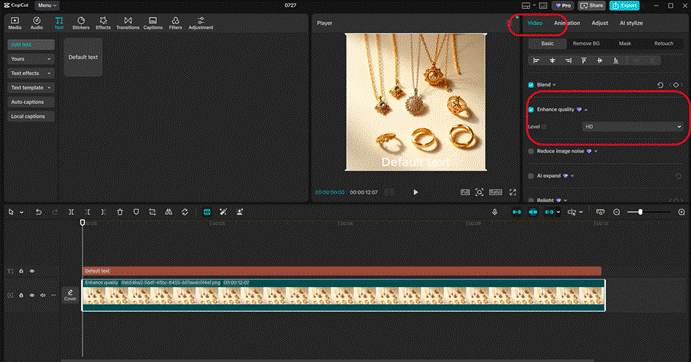
The first step is to enhance the visual quality of your footage. Go to the "Video" tab and enter the "Basic" section. Simply left-click on the "Enhance quality" icon, then toggle it on, and choose "HD" (720p or 1080p) to upscale. It is also possible to sharpen details such as clasps, wires, and gemstones by adjusting brightness, contrast, and saturation.
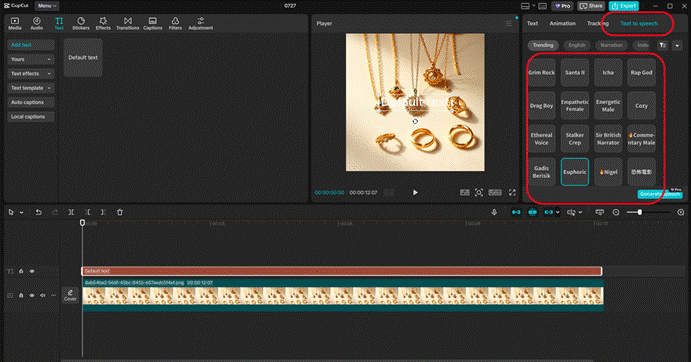
This is the moment you put in your narration. Move on to the "Text" menu and choose the "Text to speech" tab. Paste your jewellery tutorial script below the section called "Trending". At this point, select a voice that suits your teaching style. For example, the "Elegant Female" can be used perfectly well on tutorials that require elegance, whereas the "Creative Male" can bring personality to contemporary and dynamic content. Use the sliders to adjust the speed, pitch, and font size (15 points as the font size to ensure a transparent overlay). As soon as the narration sounds unnatural, drag it to the timeline and preview the edits to ensure that the sound syncs with your clips unnoticeably.
Step 4: Export and Share
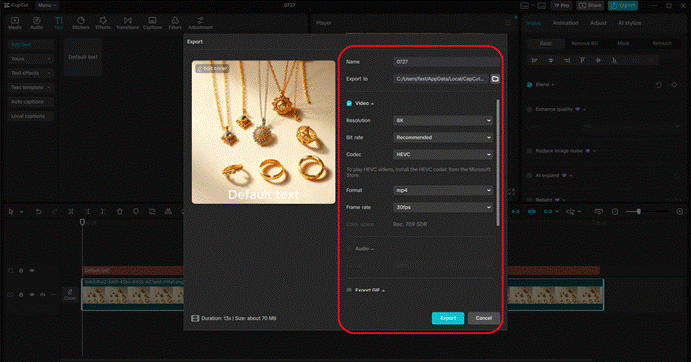
Once your Video looks finished, go to the top right of the screen and click the "Export" button. Select an output format of MP4 and set the resolution to 1080p to ensure smooth playback. Name the file on your computer so that you can save it to your device. Then, use the "Share" button to post your video on YouTube, social media, Etsy shops, or craft blogs. Your jewellery instruction is currently prepared to inspire creators worldwide.
Tools That Enhance Jewelry Video Production
CapCut is not only a voice tool, but it also provides everything needed to create influential jewelry videos. This is because the AI Voice Generator gives you the option to trade sound tones and explore the variation of vocal delivery until it fits your brand. Whether it is the guidelines for symmetrically making a pair of earrings or the distinction between types of chains, the precision of the voice maintains the interest of the listener.
On the visual quality front, the AI Video Upscaler is your tool for bringing high-quality to low-quality or unclear jewelry clips up to HD or even 4K quality. This comes in handy, particularly when one requires showing fine detailing such as filigree or texture of beads. The CapCut interface is one of the most convenient to use, as it offers timeline editing and displays results in real-time, allowing creators to merge commentary, captions, background music, or even a list of materials needed.
The free version includes everything required to get started. However, suppose you require watermarks to be removed from exports or more advanced editing features are needed. In that case, upgrading to the Pro level is a worthwhile investment, especially when you need to publish content on a regular basis.
Conclusion: Let Craftsmanship be Glorious
The game-changer here is the AI-powered features of CapCut, which serve as a solution for jewellery makers who want to teach, motivate, and engage their audience. The AI Voice Generator and the Text to Speech AI tools will keep you accurate to expressive narrations, never having to re-record any vocals of your own. Combined with features such as the AI Video Upscaler, your visuals will be as persuasive as your instructions.
Whether teaching others about jewellery online or recording how you do your professional work with them, CapCut PC enables you to present jewellery made in a professional and creative manner.